Price pins
Every result is a price pin on the map, with a list beside it.
Price pins, a hand-drawn area, a near-me radius and links you can share. The map is part of the same plain-words search.
Pre-launch. Fictional listings until your MLS is connected.
Real capture from the live demo, fictional listings. The map tiles are a normal street map.
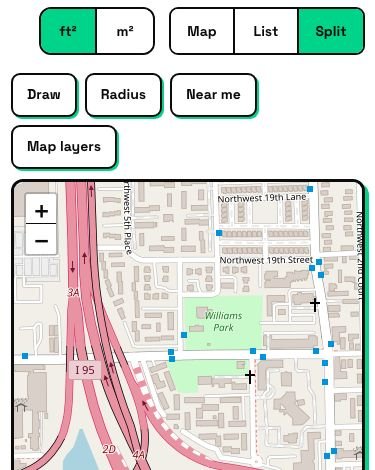
Results as a list, a map, or both side by side. On a phone the map starts on the list.
Draw the area you care about, set a radius, or tap Near me. You see only what is inside.
Copy link reopens the exact same map search. Save this search keeps it, with a buyer account.
Every result is a price pin on the map, with a list beside it.
Visitors draw the area they care about and see only what is inside.
Search around where the visitor is, within a radius they choose.
Sort the results, adjust the filter chips and get place suggestions as they type.
Every search has a link that reopens the exact same map search.
Visitors can save a search and come back to it, with a buyer account.
| The old way | IDX Bloom | |
|---|---|---|
| Draw an area | Often missing, or on desktop only | Draw, radius or Near me, in the same search |
| Sharing a search | A link that loses the filters | A link that reopens the exact same map search |
| On a phone | A crowded split screen | The map starts on the list; switch with Map, List, Split |
| Where it lives | Inside an iframe from another domain | On your own domain, no iframe |
Visitors can draw the area they care about and see only what is inside. We have not confirmed multiple shapes at once, so we do not claim them.
A standard street map that loads only when the visitor opens it on a listing page, so the page stays light.
It is built not to. Listings are cached and refreshed in the background, so a page never waits on the data feed.
It is built to be responsive. On a phone the map starts on the list, and you switch with Map, List and Split.
Yes. Copy link reopens the exact same map search, and Save this search keeps it, with a buyer account.
Yes. The map is part of the same plain-words search, so the chips and the map always agree.
The demo runs the real plugin on fictional listings. Nothing on it is a real home.
Start a free pilot (no card), try the live demo with fictional listings, or join the waitlist.